| Lesson 5 | Storage considerations for indexes |
| Objective | Separate indexes from data tables in Oracle 23ai |
Separate Indexes from Oracle Data Tables
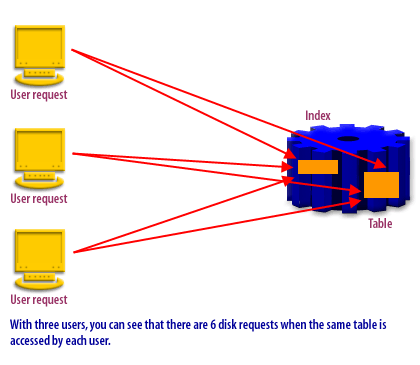
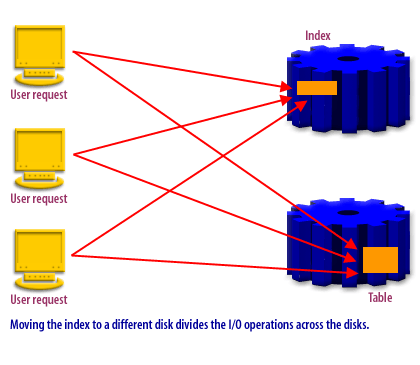
Indexes reduce the work required to locate rows, but you can often improve throughput further by separating index segments from table segments. The core idea is simple: many workloads require reads from both the index and the table. If both structures compete for the same storage resources, their I/O can queue behind each other. When you place indexes and tables on different storage paths (different tablespaces mapped to different disks, LUNs, ASM diskgroups, or storage tiers), Oracle can service those reads in parallel more effectively.
This lesson focuses on the physical design side of Oracle Database 23ai. From a relational theory perspective, indexes do not change the logical meaning of data: they are access paths that improve performance while preserving physical data independence. Your SQL does not change; only the cost of executing that SQL changes.
Why Separation Can Improve Performance
-
I/O queuing and resource contention[1]
Legacy explanations often describe a “disk head” moving across platters. Modern storage may be SSD-backed or abstracted behind a storage controller, but the performance problem still exists: storage resources have finite throughput and limited parallelism. When many sessions request blocks at once, requests queue (queue depth increases), latency rises, and overall response time suffers.
Index-based access typically involves:- Reading index blocks (often random reads)
- Then reading table blocks by rowid (often additional random reads)
-
Separating indexes using tablespaces
Oracle gives you control over where segments live through tablespaces. At creation time, you place a table in one tablespace and its indexes in another. For existing objects, you can move (rebuild) an index into a different tablespace. The separation is meaningful only when the underlying storage is mapped to different resources.
The practical goal is not “separate everything,” but to separate what your workload stresses most. In OLTP systems, moving heavily-used indexes away from busy table segments can reduce latency for high-frequency lookups and joins. In reporting systems, separation is often combined with partitioning, compression, and selective indexing to control scan cost.
What “Separate Indexes” Means in Practice
“Separate indexes from tables” is implemented by placing them in different tablespaces, and then mapping those tablespaces to different storage resources.
Typical Layout Patterns
- Two tablespaces, two storage paths:
APP_DATA_TS(tables) andAPP_INDEX_TS(indexes) - Tiered storage: hot indexes on faster storage, colder data on cheaper storage
- ASM diskgroups: data tablespaces in one diskgroup, index tablespaces in another
- Dedicated index tablespace per workload: isolate a “hot” index family (for a critical module) to reduce interference
Separation helps most when the database routinely performs physical I/O. If your workload is entirely cached, storage placement matters less than buffer cache efficiency and CPU. In real systems, the truth is mixed: caching helps, but peak concurrency and working-set size eventually push I/O back into the critical path.
Creating Indexes in a Separate Tablespace
When you create an index, you can specify its tablespace directly. The TABLESPACE clause tells Oracle where
to allocate the index segment.
Example: Create Data and Index Tablespaces
-- Example only: choose datafiles and sizing appropriate to your environment

CREATE TABLESPACE app_data_ts
  DATAFILE '.../app_data_01.dbf'
  SIZE 2G AUTOEXTEND ON NEXT 256M;

CREATE TABLESPACE app_index_ts
  DATAFILE '.../app_index_01.dbf'
  SIZE 1G AUTOEXTEND ON NEXT 256M;
Example: Place the Table and Index in Different Tablespaces
CREATE TABLE bid
(
  bid_id            NUMBER      NOT NULL,
  bidder_client_id  NUMBER      NOT NULL,
  bid_amount        NUMBER(10,2) NOT NULL,
  created_ts        TIMESTAMP   NOT NULL
)
TABLESPACE app_data_ts;

CREATE INDEX bid_client_idx
ON bid (bidder_client_id ASC)
TABLESPACE app_index_ts;
This layout ensures table blocks are allocated in APP_DATA_TS while index blocks are allocated in
APP_INDEX_TS. If those tablespaces are backed by different storage resources, Oracle can reduce contention
between index reads and table reads.
Moving an Existing Index to Another Tablespace
To move an existing index, rebuild it into the target tablespace. This is also a convenient time to defragment the index.
ALTER INDEX bid_client_idx REBUILD TABLESPACE app_index_ts;
In many environments, rebuild operations can be performed with minimal disruption, but you should still treat them as change-window tasks for busy production systems. The index rebuild generates redo and consumes I/O and CPU.
Separating Index Produces Better Results in Oracle
Choosing Index Columns That Benefit from Separation
Separating index storage helps most when the index is frequently used and the workload is I/O sensitive. Your indexing strategy should start with how users query data, then you decide which high-impact indexes deserve premium placement.
High-Value Index Candidates
-
Predicate columns: Create indexes on columns frequently used in selective
WHEREpredicates. If multiple columns are used together, consider a composite (concatenated) index. - Join columns (often foreign keys): Index join predicates that occur repeatedly, especially when joins drive OLTP request latency.
- Covering patterns: If a query repeatedly returns the same small set of columns, a covering index can reduce table access. (Even when Oracle must visit the table for other reasons, covering patterns can still reduce work.)
-
Ordering and grouping: Index columns used in
ORDER BY,GROUP BY,UNION, andDISTINCTwhen it reduces sorting or improves access paths.
Multicolumn indexes are especially effective when your workload commonly filters on multiple columns together. A single, well-designed composite index can outperform multiple single-column indexes for the same predicate set while reducing redundant maintenance overhead.
There are other ways to optimize performance beyond tablespace separation. The next section summarizes three physical design structures that can reduce I/O under the right workload.
There are other ways that you can optimize performance which are discussed in the section below.
Database Structures That Optimize I/O
Beyond separating tables and indexes into different tablespaces, Oracle offers physical structures that change how data is located on disk. These do not change relational meaning; they change access cost and locality.
| Hash cluster | Stores rows based on a hash of the cluster key so Oracle can compute the hash and go directly to the target blocks. This can reduce lookups to a small number of I/Os for equality predicates on the cluster key. |
| Index-organized table (IOT) | Stores table rows in a B-tree structure keyed by the primary key. Key-based access can require fewer I/Os because the “table” is the index. Secondary indexes still exist, and their maintenance must be considered. |
| Partitioning | Spreads data and indexes across partitions. Oracle can prune partitions that cannot satisfy predicates, reducing I/O by avoiding irrelevant segments. Partitioning is often combined with local indexes for manageability. |
Hash Clusters
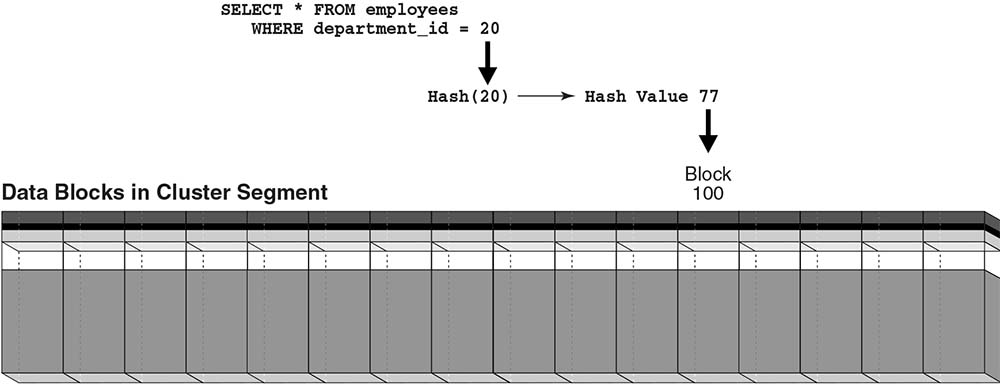
A hash cluster is designed for high-speed equality lookups on a cluster key. Oracle applies a hash function to the key and maps it to a bucket (block range). For workloads that repeatedly query by a known key value, the database can locate the correct bucket quickly.
Example query patterns include:
SELECT *
FROM employees
WHERE department_id = :p_id;

SELECT *
FROM departments
WHERE department_id = :p_id;

SELECT *
FROM employees e, departments d
WHERE e.department_id = d.department_id
AND d.department_id = :p_id;
If a user queries department_id = 20, Oracle might hash the key to an internal bucket identifier and then
visit the bucket blocks. Figure 5-5 depicts the concept: a hash cluster segment as a horizontal row of buckets/blocks.
SELECT *
FROM employees
WHERE department_id = 20;
Limitations: Hash clusters are not designed for range scans because the hash does not preserve order. They also require careful sizing: too few buckets causes collisions/overflow; too many wastes space. Use hash clustering only when the access pattern is stable and dominated by equality predicates on the cluster key.
The next lesson is about altering an index.
Adding Indexes - Exercise
Click the Exercise link below to practice creating additional indexes for the COIN database.