| Lesson 5 | Diagramming types of relationships |
| Objective | Identify the constructs for diagramming relationship types in Crow's Foot notation. |
ER Diagram Relationship Types: One-to-One, One-to-Many, and Many-to-Many
Relationship types describe how many instances of one entity may be associated with instances of another. The familiar 1:1, 1:N, and M:N labels describe maximum cardinality. They do not specify whether participation is optional or required.
Read each endpoint as the number of instances at that end related to one instance at the opposite end. A full Crow's Foot endpoint combines a minimum with a maximum: a circle permits zero, a minimum bar requires one, and the outer bar or crow's foot sets the maximum to one or many.
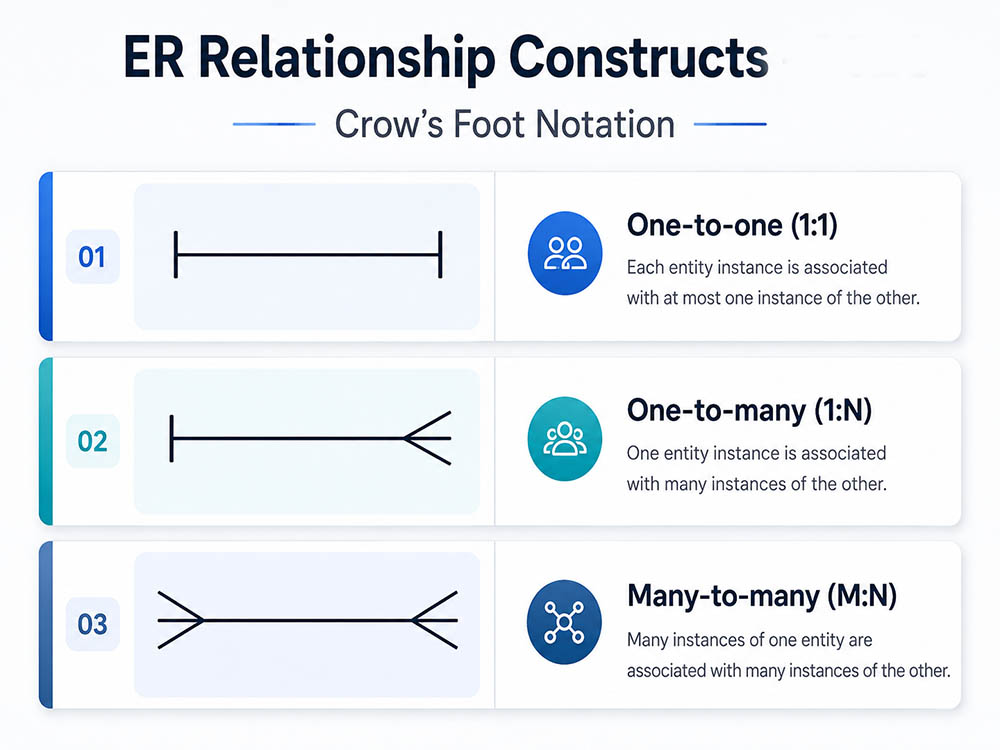
The Crow's Foot Means Many
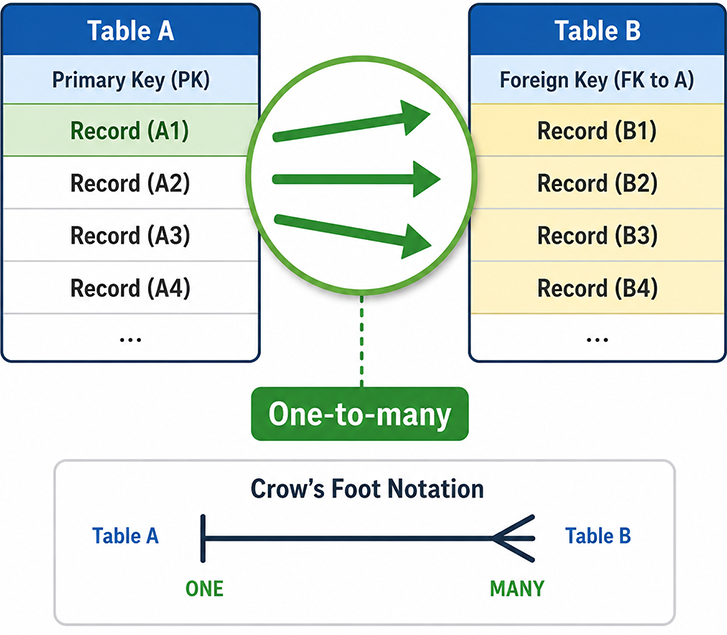
Do not interpret “many” as a minimum. An office with no employees can satisfy a 1:N rule when employee participation for the office is optional. Minimum participation must be stated separately.
1. One-to-One: Limit the Child Reference with UNIQUE
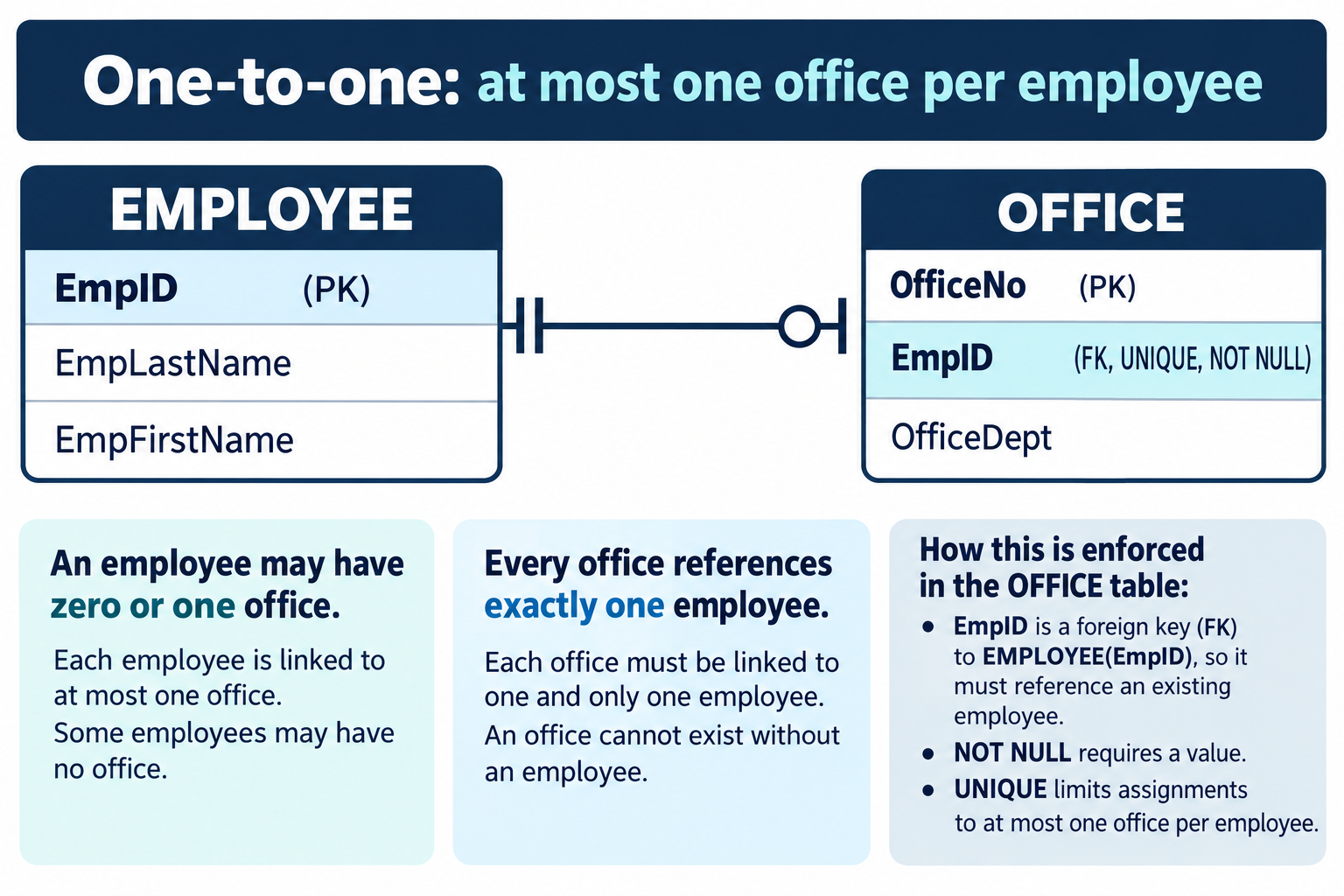
The rule describes an individual office assignment, not a shared workplace. It differs from earlier office examples that allowed many employees per office. Requirements determine the relationship; the entity names alone do not.
A foreign key plus NOT NULL and UNIQUE enforces this optional 1:1 pattern. It does not require every employee to have an office. A shared-primary-key child table likewise limits a parent to at most one child without requiring a child for every parent. Mandatory participation on both sides needs an additional enforcement strategy.
2. One-to-Many: Put the Reference on the Many Side
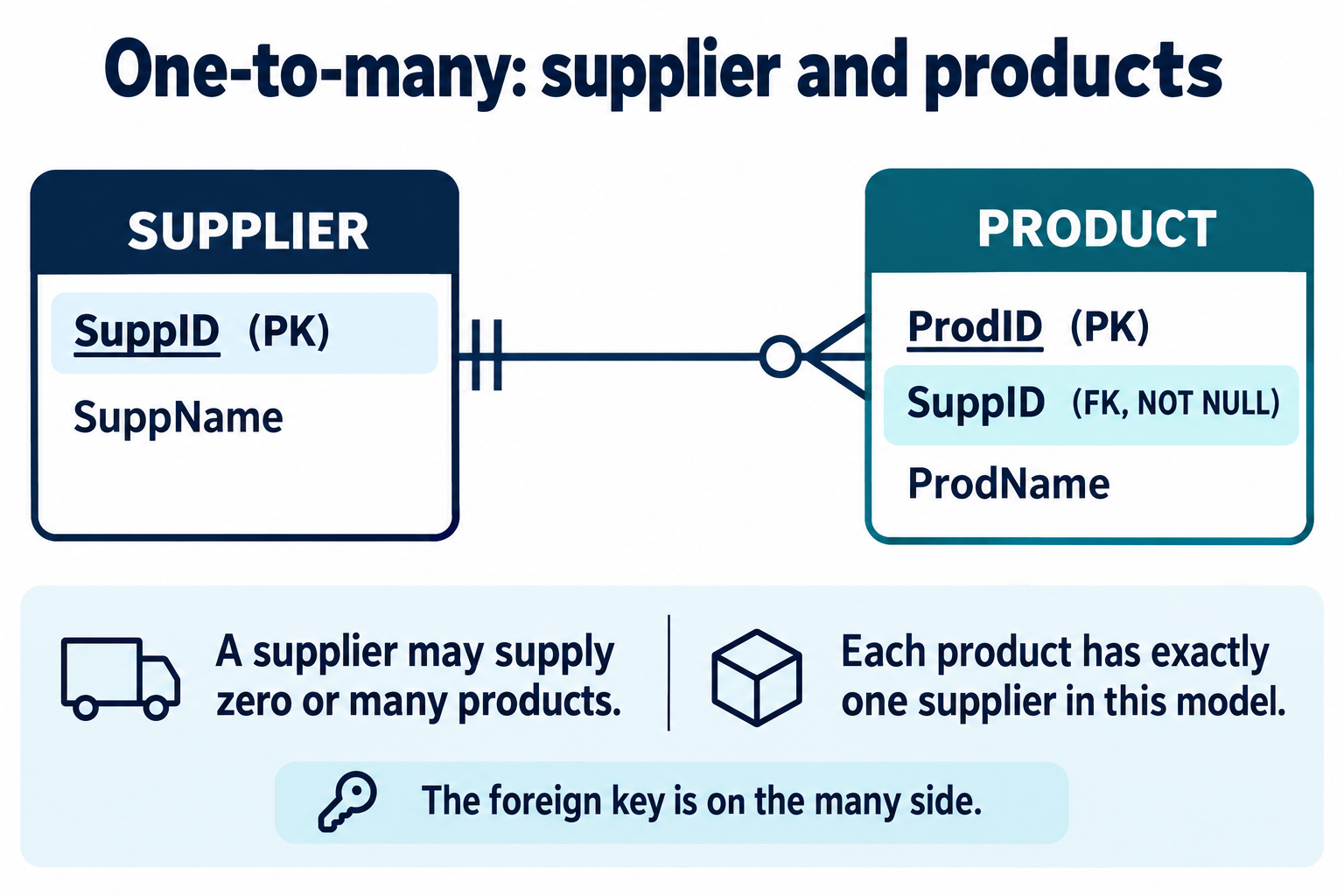
This simplified rule chooses one supplier per product. If a product can have multiple suppliers, a supplier-product association would be needed instead. An empty supplier is allowed here; a product with a missing supplier reference is not.
3. Many-to-Many: State the Conceptual Rule
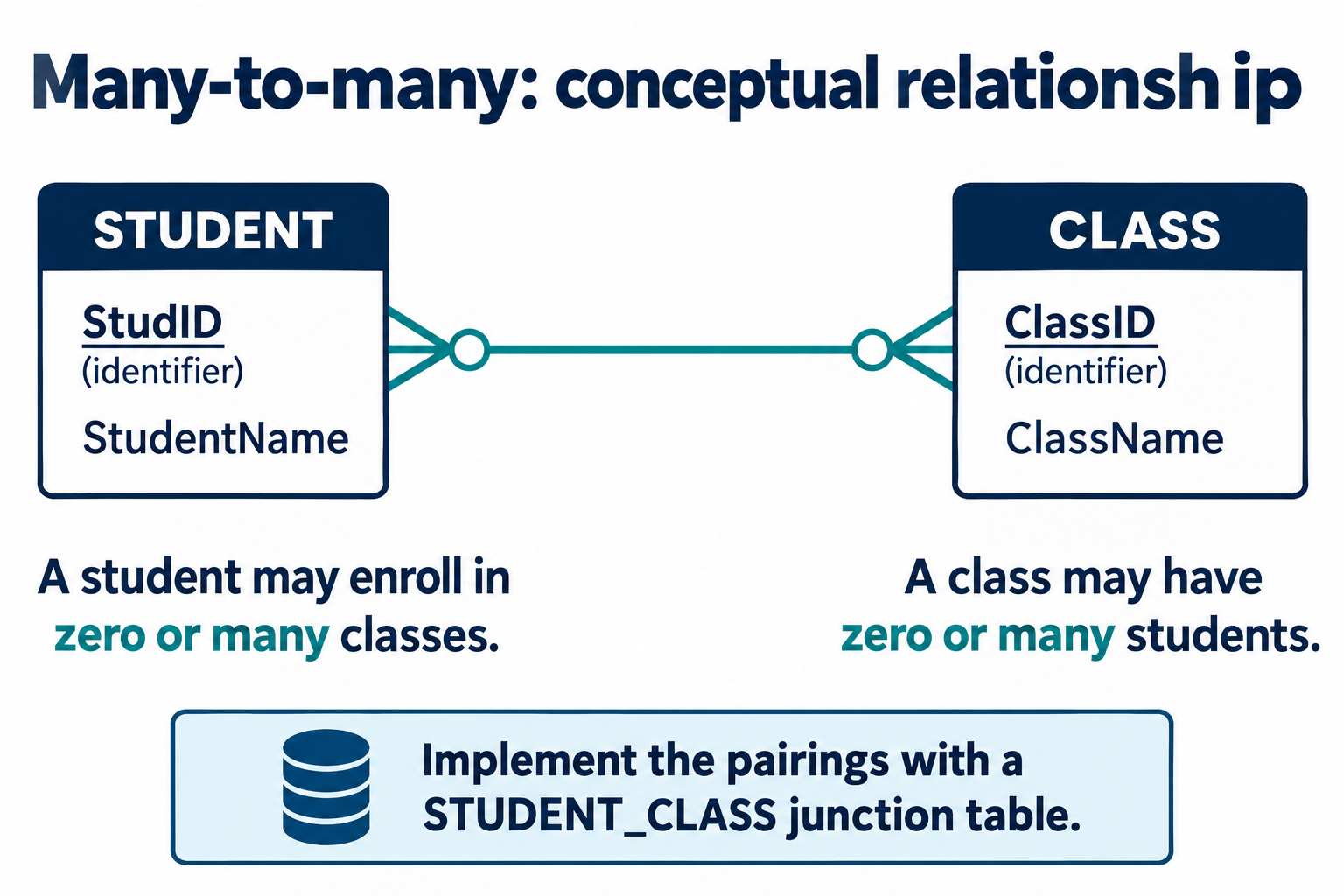
CLASS represents one class offering. The same student can join different offerings, but this example permits only one enrollment per student-offering pair.
4. Resolve the Pairings into an Associative Table
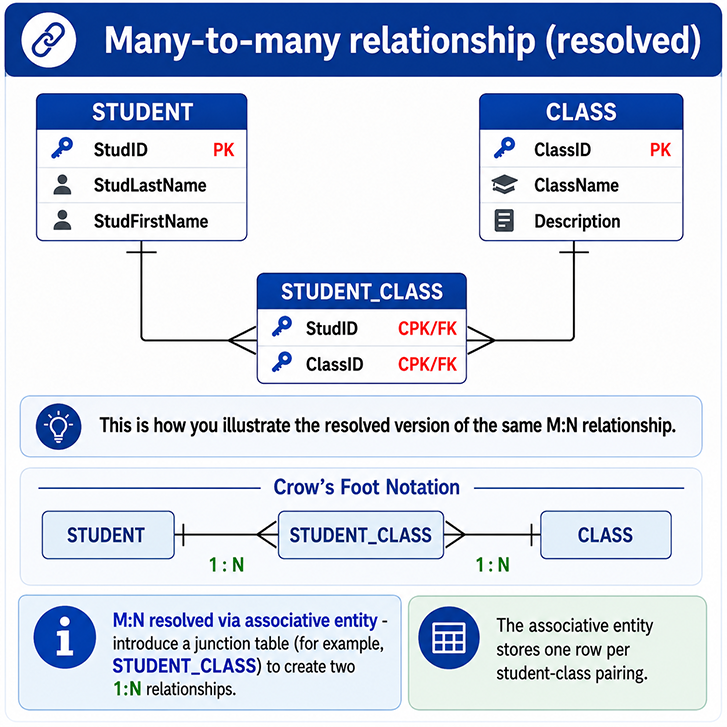
An associative entity[1] records the relationship itself. STUDENT_CLASS stores one row per pairing, with optional relationship attributes such as Grade. Two foreign keys and a composite primary key implement the association without repeating student or class descriptions.
Translate the Rules into Constraints
The following examples use SQLite with foreign-key enforcement enabled. Run PRAGMA foreign_keys = ON; before a transaction. IDs are supplied explicitly. Other systems may require platform-specific setup or types. These examples emphasize relationship constraints, not a complete operational schema.
PRAGMA foreign_keys = ON;

CREATE TABLE EMPLOYEE (
    EmpID INTEGER PRIMARY KEY,
    EmpLastName VARCHAR(60) NOT NULL,
    EmpFirstName VARCHAR(60) NOT NULL
);
CREATE TABLE OFFICE (
    OfficeNo INTEGER PRIMARY KEY,
    EmpID INTEGER NOT NULL UNIQUE,
    OfficeDept VARCHAR(100),
    FOREIGN KEY (EmpID) REFERENCES EMPLOYEE(EmpID)
);

CREATE TABLE SUPPLIER (
    SuppID INTEGER PRIMARY KEY,
    SuppName VARCHAR(100) NOT NULL
);
CREATE TABLE PRODUCT (
    ProdID INTEGER PRIMARY KEY,
    SuppID INTEGER NOT NULL,
    ProdName VARCHAR(100) NOT NULL,
    FOREIGN KEY (SuppID) REFERENCES SUPPLIER(SuppID)
);

CREATE TABLE STUDENT (
    StudID INTEGER PRIMARY KEY,
    StudentName VARCHAR(100) NOT NULL
);
CREATE TABLE CLASS (
    ClassID INTEGER PRIMARY KEY,
    ClassName VARCHAR(100) NOT NULL
);
CREATE TABLE STUDENT_CLASS (
    StudID INTEGER NOT NULL,
    ClassID INTEGER NOT NULL,
    Grade VARCHAR(2),
    PRIMARY KEY (StudID, ClassID),
    FOREIGN KEY (StudID) REFERENCES STUDENT(StudID),
    FOREIGN KEY (ClassID) REFERENCES CLASS(ClassID)
);
The figures and SQL use the same relationship rules; descriptive attributes are shortened where they are not central to the example. UNIQUE limits office assignments, repeated SuppID values permit many products, and the junction primary key prevents duplicate student-class pairs. NOT NULL requires each child reference, while the foreign key requires a matching parent. None of these requires every parent to have a child.
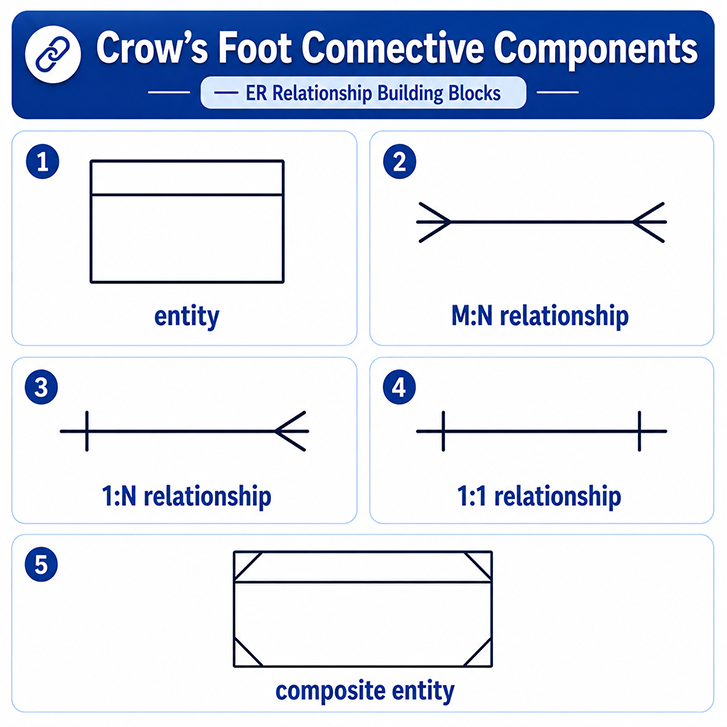
Elements of a Crow's Foot ER Diagram
The overview below summarizes boxes and maximum-cardinality connectors. It is not a complete participation legend.
Common Mistakes
- Treating one-to-one as automatically mandatory on both sides.
- Reading an unadorned crow's foot as “one or more.” It specifies the maximum; a minimum marker supplies the rest.
- Confusing identifying relationships, which concern key composition, with mandatory participation.
- Treating a conceptual M:N diagram as invalid instead of explaining its relational implementation.
- Assuming diagram labels enforce rules without corresponding database constraints.
See Crow's Foot notation for the endpoint combinations.
ER Diagram Check
For SUPPLIER ||-----o{ PRODUCT, can a supplier have no products? Yes. Can a product have no supplier? No. Can two products reference the same supplier? Yes. The next lesson examines mandatory and optional participation in more detail.